Introduction
Media teams and digital leaders face persistent confusion when evaluating CMS architecture — the terms "headless" and "decoupled" appear interchangeable in vendor marketing, yet they describe meaningfully different systems. CMS vendors sometimes use these terms synonymously, but decoupled systems offer native presentation layers while headless CMSs do not.
That distinction matters in practice. Choosing the wrong architecture affects publishing speed, developer workload, content team autonomy, and long-term scalability — particularly for organisations running high-volume operations across web, mobile, and other channels.
The stakes are real: six online networks now reach more than 10% of the population weekly for news, up from just two a decade ago. The infrastructure you choose determines whether your content can serve these audiences at scale.
What follows cuts through the vendor noise — clear definitions, a side-by-side comparison, and a practical framework to help you choose the architecture that fits your team.
TL;DR
- A headless CMS strips out the front-end presentation layer entirely, delivering content only via APIs
- Decoupled CMSs also separate backend from frontend, but retain an optional pre-built presentation layer for teams who need it
- All headless CMSs are technically decoupled, but not all decoupled CMSs are headless
- Headless suits developer-heavy teams needing maximum flexibility and multi-channel delivery
- Decoupled fits teams wanting API flexibility without abandoning a ready-to-use frontend
Headless CMS vs Decoupled CMS: A Quick Comparison
| Attribute | Headless CMS | Decoupled CMS | Traditional CMS |
|---|---|---|---|
| Built-in Frontend | None — frontend must be custom-built | Optional pre-built frontend available | Tightly coupled frontend included |
| Content Delivery Method | API-only (REST or GraphQL) | API-based or default frontend | Database queries to integrated frontend |
| Developer Effort Required | High — full frontend build and ongoing maintenance | Medium — use default frontend or build custom | Low — templates provided out-of-the-box |
| Content Preview for Editors | Limited — requires custom preview build | Built-in WYSIWYG preview available | Live preview included by default |
| Flexibility/Customisation | Maximum — complete frontend control | Moderate — constrained by default structure | Limited — bound by CMS architecture |
| Ideal For | Multi-channel distribution, developer-led teams | Website-first with selective API use, mixed technical teams | Single-channel websites, non-technical teams |
| Omnichannel Support | Native — content as pure structured data | Supported but may require workarounds | Minimal — primarily web-focused |
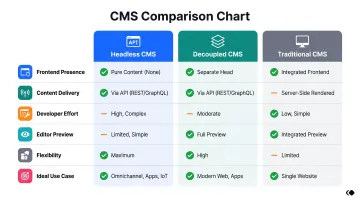
The right choice comes down to one question: how much of your content needs to reach audiences beyond a website? If the answer is "a lot," headless is worth the engineering investment. If you need a working web presence without a full dev team, decoupled gives you flexibility without starting from scratch.
What is a Headless CMS?
A headless CMS is a backend-only content management system that stores and manages content without any built-in presentation layer. It delivers content exclusively through APIs (REST or GraphQL) to any frontend, platform, or device that requests it. The "head" (frontend) is entirely absent.
Content is stored as structured data, agnostic of how it will be displayed. Developers build and own the full presentation layer independently, using any framework or technology they choose — React, Next.js, Vue, or others. The CMS knows nothing about whether your content appears on a website, mobile app, or smartwatch.
These architectural choices carry real consequences for both developers and content teams. Here's what headless CMS delivers — and where it falls short.
Advantages of a Headless CMS
- Choose any tech stack — developers iterate on the frontend without touching the content backend, supporting diverse platforms without architectural constraints.
- Publish once, distribute everywhere — the same content reaches websites, mobile apps, digital signage, smartwatches, and AI-driven interfaces simultaneously. With 14+ platforms now part of the news ecosystem and video news consumption up from 52% to 65% between 2020 and 2025, this matters for media organisations distributing across channels.
- Faster load times via CDN caching — API-first architecture can produce a 40-60% latency reduction by enabling aggressive edge caching with no monolithic frontend overhead.
- Reduced attack surface — separating the CMS admin interface from public-facing delivery limits exposure to SQL injection, XSS, and CSRF vulnerabilities.
Challenges of a Headless CMS
The flexibility comes with trade-offs that are significant enough to disqualify headless CMS for certain teams.
- Custom frontend from scratch — every presentation element must be built and maintained by developers, which increases upfront time and requires ongoing engineering capacity. Small or non-technical teams often underestimate this cost.
- No native content preview — without a built-in frontend, editors cannot see how content will appear to end users before publishing, creating friction for editorial workflows that depend on visual feedback.
What is a Decoupled CMS?
A decoupled CMS separates content management (backend) from content presentation (frontend) using an API — but unlike headless, it retains an optional, pre-built frontend layer that teams can use immediately without custom development.
A decoupled CMS sits between a traditional (monolithic) CMS and a headless CMS, offering API-based delivery for omnichannel use while also providing ready-to-use themes, templates, and a WYSIWYG editing environment. WordPress and Drupal are the most common examples — WordPress powers 42.2% of all websites and holds 59.6% of CMS market share.
Advantages of a Decoupled CMS
- Ships with a working frontend out of the box, so teams can launch without waiting on custom development — valuable when engineering capacity is limited
- Built-in WYSIWYG tools and live preview let editors see exactly how content will appear before publishing, with no developer involvement needed
- Organisations can start with the default frontend, then progressively layer in API-based delivery for new channels as requirements grow
Challenges of a Decoupled CMS
- The built-in frontend and preconfigured content structure can impose constraints that become harder to work around as requirements grow more complex
- Keeping the default frontend layer active introduces unnecessary processing load; benchmarks from Smashing Magazine showed a decoupled WordPress approach is 2–3x faster than the default WordPress REST API, and up to 8x faster when the installation is plugin-heavy
Key Differences Between Headless and Decoupled CMS
| Dimension | Headless CMS | Decoupled CMS |
|---|---|---|
| Frontend presence | No presentation layer; fully frontend-agnostic | Built-in frontend is optional but still present |
| Content storage | Pure structured data — portable across any channel | May store content partially as HTML tied to the default frontend |
| Developer flexibility | Maximum freedom; every frontend change needs developer input | Reduces developer reliance for basic tasks but can constrain frontend innovation at scale |
| Editorial independence | Editors depend on developers for most presentation changes | Editors can manage more tasks without developer involvement |
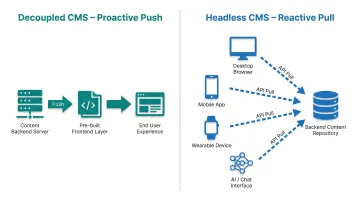
A useful way to frame the difference: a decoupled CMS is "proactive" — it prepares and pushes content into a delivery environment. A headless CMS is "reactive," sitting in the background and waiting for applications to pull content via API on demand.
For AI-era publishing: Structured content stored in a headless architecture is better suited for AI-driven content operations, personalisation engines, and distribution to AI search surfaces. Research suggests headless CMS content matches the patterns LLMs encountered during training, making it easier for AI to reproduce accurately.
RAG-based LLMs also prefer structured content fields — they are far easier to surface as relevant, trustworthy sources than content stored with HTML presentation markup embedded throughout.
Which One is Right for You?
Choose headless CMS if you:
- Need multi-channel delivery at scale (web, app, newsletter, syndication feeds simultaneously)
- Have a dedicated development team to build and maintain custom frontends
- Want full frontend control with no architectural constraints
- Are building for long-term content infrastructure growth
- Serve diverse platforms including AI-driven surfaces and smart devices
Choose decoupled CMS if you:
- Are primarily web-focused with occasional API integrations
- Prefer faster setup with a ready-to-use frontend
- Lack the developer resources to build from scratch
- Want to gradually expand to additional channels without an immediate full rebuild
- Need non-technical content teams to work independently with WYSIWYG tools
Neither choice is final — and that's worth knowing before you commit.
The choice is not permanent. Many organisations start with a decoupled setup and migrate to headless as their content operations mature and channel complexity grows. Start by mapping your current team capacity, short-term goals, and a realistic 2–3 year content roadmap.
Platforms like Publive bridge this gap by offering headless-ready architecture with an editorially-friendly content interface, giving media teams the flexibility to publish across channels without forcing content editors out of familiar workflows.
Real-World Use Cases for Publishers and Content Teams
Media and News Organisations
High-volume news publishers benefit most from headless architecture. Content created once in the backend pushes simultaneously to the web, mobile app, AMP pages, and third-party syndication — no duplication needed.
Vox Media migrated Vox.com, Polygon, and The Verge from its proprietary Chorus CMS to a headless WordPress multisite with a custom GraphQL API. Even large media organisations with complex publishing workflows find headless architecture worth the investment. Indian publishers managing multi-platform distribution — print, web, OTT, and mobile — face the same challenge and are making similar moves.
Digital-First Brands and BFSI Platforms
Financial institutions use decoupled or headless CMS to deliver personalised content — promotions, banners, product updates — across web and mobile without duplicating editorial effort.
Bank First achieved 30% lower campaign launch costs and 50% faster time to market after migrating to Contentful's composable DXP. In India, banks and NBFCs running content-heavy compliance and product pages face similar bottlenecks, where a structured content layer separating editorial from delivery directly reduces go-live friction.

Corporate and Healthcare Websites
Mid-size organisations — hospital chains, healthcare brands, multi-location enterprises — typically choose a decoupled CMS. They need:
- A reliable content management UI that non-technical teams can operate independently
- Occasional API integrations with CRM, EHR, or analytics tools
- A website-first focus without managing complex frontend infrastructure
Gundersen Health System uses Drupal on Acquia to create a unified "digital front door" with EHR integration and a provider directory. Multi-hospital systems in India looking to consolidate patient-facing content across departments follow the same model.
Frequently Asked Questions
Is a decoupled CMS the same as a headless CMS?
No. All headless CMSs are decoupled in architecture, but not all decoupled CMSs are headless. The key difference is that headless CMSs have no built-in frontend layer at all, while decoupled CMSs retain an optional, pre-built presentation layer.
Which CMS architecture is better for omnichannel publishing?
Headless CMS is generally better suited for true omnichannel delivery since content is stored as pure structured data and can be pushed to any platform via API. Decoupled CMS supports omnichannel delivery, but the presence of a default frontend can impose some constraints on content portability.
Does headless CMS require more developer resources than decoupled?
Yes. Headless CMS typically requires a larger development investment upfront since the entire frontend presentation layer must be built and maintained custom. Decoupled CMS reduces this burden by offering a ready-to-use frontend that content teams can operate without developer assistance.
Is WordPress a headless or decoupled CMS?
WordPress is primarily a traditional CMS but can function as a decoupled CMS. It includes a default frontend but also exposes REST APIs (bundled since version 4.7), allowing developers to build custom frontends while still using WordPress as the content backend.
What is the difference between API-first and headless CMS?
"API-first" describes a design philosophy where the API is the primary interface for accessing content. "Headless" refers specifically to the absence of a built-in frontend. Most headless CMSs are API-first by design, but a CMS can be API-first while still offering an optional frontend, which makes it decoupled rather than headless.
Which CMS architecture is best for media and news publishing teams?
Media and news organisations with high content volume and multi-channel distribution needs typically benefit more from headless CMS. It enables publishing to web, mobile, newsletters, and syndication feeds from a single content backend. Teams with limited developer resources may find a decoupled CMS easier to adopt initially.