

TL;DR
- Enterprise platforms like Publive unify CMS, social distribution, push notifications, and analytics; social-only tools like Buffer cover just social posting
- Choose based on publishing volume, team size, and whether you need basic scheduling or an end-to-end content operations platform
- AI now handles auto-distribution, publish-time optimisation, content repurposing, and audience performance tracking
- Media publishers need CMS integration, multi-format support, editorial workflows, and analytics that connect publishing to audience metrics
What Are Content Scheduling and Multi-Channel Publishing Tools?
Content scheduling tools let teams plan, queue, and auto-publish content across multiple channels—social media, websites, email, and push notifications—from one centralised interface. They reduce manual posting, eliminate coordination overhead, and ensure content reaches audiences at optimal times.
Social-Only vs. Full-Stack Platforms
| Social-Only Schedulers | Full-Stack Platforms | |
|---|---|---|
| Examples | Buffer, Hootsuite, Sprout Social | Publive, CoSchedule |
| Channels covered | Social platforms only (Facebook, Instagram, LinkedIn, X, TikTok) | Web publishing, social, email, push notifications |
| CMS integration | No | Yes |
| Content lifecycle | Scheduling, basic analytics, engagement tracking | Creation through distribution to analytics |
| Best for | Dedicated social teams | Media publishers managing multi-channel output |
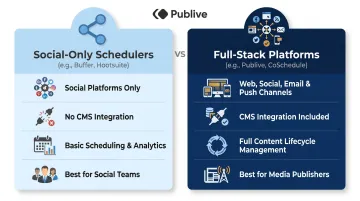
For media publishers pushing hundreds of articles daily, this distinction determines whether a tool simplifies or fragments workflows.
The tools covered here span both categories, assessed on multi-channel support, AI capabilities, workflow depth, analytics, and fit for content-heavy organisations.
Top Tools for Automating Content Scheduling and Multi-Channel Publishing
These platforms were selected based on multi-channel depth, scheduling automation, AI features, team collaboration workflows, analytics quality, and suitability for media publishers, brands, and enterprise content teams.
Publive
Publive is an AI-first Digital Experience Platform built for media houses, brands, financial institutions, and healthcare organisations. It consolidates CMS, social distribution, push notifications, and analytics into one unified system, eliminating the need for separate vendors.
Where it stands out: One platform replaces the entire vendor stack. Key differentiators:
- Cuts total cost of ownership by 50% by consolidating CMS, social scheduler, analytics, and notifications
- Converts articles into web stories, videos, audio, social posts, and newsletters automatically
- Delivers 60% faster content output through AI workflows
- Maintains 99.995% uptime on AWS with GA4 and Google Search Console integration
- Trusted by Indian Express, News Nation, Kanak News, and Sambad
| Feature | Details |
|---|---|
| Key Features | AI content creation and repurposing, multi-channel publishing (web + social + push), GA4 and GSC analytics, WCAG compliant, DPDP ready |
| Pricing | Custom enterprise pricing; usage-based billing for lower TCO |
| Best For | Media houses, digital publishers, brands, and financial institutions needing all-in-one CMS + distribution |

Buffer
Buffer is a widely adopted social media scheduler known for simplicity and per-channel pricing. Small businesses, startups, and solo content creators use it for no-frills scheduling across Instagram, LinkedIn, Facebook, TikTok, X, and more.
What sets it apart: Buffer's clean interface and generous free plan (3 channels, 10 scheduled posts) make it accessible to small teams. The AI Assistant generates captions and post ideas on all plans, including free. Per-channel pricing keeps costs predictable—starting at ₹500/month per channel on annual billing. The limitation: Buffer is a social-only scheduler. It doesn't integrate with CMS platforms or support website publishing, making it unsuitable for publishers managing full editorial workflows.
| Feature | Details |
|---|---|
| Key Features | AI Assistant for captions, queue-based scheduling, analytics, hashtag manager, first comment scheduling |
| Pricing | Free (3 channels, 10 posts); from ₹500/month per channel (paid plans) |
| Best For | Small businesses, startups, and solo creators focused solely on social media |
Hootsuite
Hootsuite is a comprehensive social media operations platform serving enterprises and agencies. It offers unified scheduling, inbox management, AI-powered content via OwlyGPT, bulk scheduling for up to 350 posts, and social listening across major platforms.
The differentiator: Hootsuite functions as a full social media operations hub. Real-time brand monitoring, competitor benchmarking, and advanced analytics reporting suit teams managing high engagement volumes. OwlyGPT assists with content brainstorming, caption generation, and risk flagging.
The trade-off: pricing starts at ₹16,500/user/month (Standard plan, annual billing), positioning it for teams with dedicated social budgets rather than cost-conscious startups.
| Feature | Details |
|---|---|
| Key Features | Bulk scheduling (350 posts via CSV), OwlyGPT AI assistant, unified social inbox, DM automation, brand monitoring, approval workflows |
| Pricing | From ₹16,500/user/month (Standard plan); Enterprise pricing available |
| Best For | Agencies and enterprise brands managing multiple accounts with high engagement |
Sprout Social
Sprout Social is a premium social media management platform built for enterprise brands and large agencies. It offers deep analytics, social listening, influencer marketing tools, employee advocacy features, and 24/5 live support on all plans.
Where it excels: Sprout goes beyond scheduling. Competitor analysis, sentiment tracking, AI-assisted content suggestions, and strategic consultation add-ons separate it from cheaper alternatives. Professional plans include unlimited social profiles, making it scalable for large organisations.
The premium price (from ₹16,500/user/month for Standard; ₹33,000/user/month for Advanced) is justified by enterprise-grade features and live human support. Best suited to teams where social directly impacts revenue.
| Feature | Details |
|---|---|
| Key Features | Social listening, sentiment analysis, AI Assist suggestions, unlimited profiles (Professional+), competitor insights, digital asset library |
| Pricing | From ₹16,500/user/month (Standard); ₹33,000/user/month (Advanced) |
| Best For | Enterprise brands and large agencies with premium social budgets |
CoSchedule Marketing Calendar
CoSchedule is an all-in-one marketing calendar designed for content-heavy teams coordinating blog posts, social media, email campaigns, and project tasks in one unified view. It's particularly useful for teams managing diverse content types and recurring campaigns.
What sets it apart: CoSchedule's unified calendar provides a single source of truth across all content activities. Reusable task templates, content workflow automation, and built-in analytics reporting suit content marketing teams running multiple simultaneous campaigns. The cross-channel view fills the gap between pure social schedulers and full enterprise CMS platforms. Plans start at ₹2,400/month (Social Calendar), with the Marketing Suite offering advanced features at custom pricing.
| Feature | Details |
|---|---|
| Key Features | Unified marketing calendar, reusable task templates, social scheduling, blog/email integration, campaign analytics |
| Pricing | Marketing Calendar from ₹2,400/month; Marketing Suite at custom pricing |
| Best For | Content marketing teams managing high-volume, diverse content calendars |
How We Chose These Tools
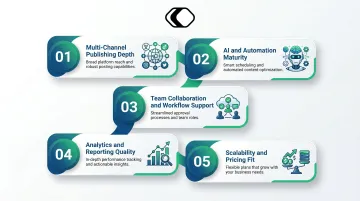
Tool evaluation focused on five practical criteria for content-heavy organisations:
1. Multi-channel publishing depth — whether the tool handles just social or extends to web, push, and email
2. AI and automation maturity — features beyond basic scheduling, including auto-distribution, content repurposing, and intelligent recommendations
3. Team collaboration and workflow support — approval flows, role-based access, editorial calendar features
4. Analytics and reporting quality — ability to connect performance data to business outcomes
5. Scalability and pricing fit — whether cost structure matches the intended user profile
Common Selection Mistakes
Teams commonly make three evaluation errors:
- Choosing social-only schedulers when the actual need is a full distribution platform
- Prioritising the lowest price without accounting for additional tools they'll still need to buy separately
- Overlooking integration depth with existing CMS or analytics systems
The best fit depends on your content volume, channel mix, and operational complexity. A solo creator may thrive on Buffer. A media house publishing 200 articles daily needs a platform that handles CMS, distribution, and analytics together — not three separate tools bolted together.
Conclusion
The tools on this list serve different stages of content maturity—from simple social scheduling to full multi-channel publishing operations. The most important criterion is operational fit: how well a tool integrates with your publishing infrastructure, not just its feature count.
Before committing, weigh scalability, integration depth, total cost of ownership (including tools the platform can replace), and the quality of vendor support — not just the feature list on a pricing page.
For media houses, digital publishers, and content teams needing to consolidate CMS, social distribution, push notifications, and analytics into one AI-powered platform, Publive offers an enterprise-grade solution built specifically for high-volume publishing teams managing multi-channel distribution at scale.
Frequently Asked Questions
What is the difference between scheduling and automation?
Scheduling is the manual act of queuing content to publish at a specific time. Automation goes further—triggering publishing, repurposing, and distribution based on rules, workflows, or AI without manual input for each piece.
What are the top 5 automation tools?
Publive, Buffer, Hootsuite, Sprout Social, and CoSchedule are featured in this article. The best choice depends on your use case: enterprise media publishers need platform-level tools like Publive; smaller teams may find social schedulers like Buffer sufficient.
What are the four pillars of marketing automation?
The four pillars are: planning and scheduling, content creation and repurposing, distribution and publishing, and performance analytics. Strong automation tools address all four in a single workflow.
Can content scheduling tools support multi-channel publishing from a single dashboard?
Yes, enterprise-grade platforms like Publive support multi-channel publishing (web, social, email, push notifications) from one interface. Simpler social schedulers are limited to social platforms only. Verify channel support before selecting a tool.
What should media publishers look for in a content scheduling tool?
Media publishers need CMS integration, multi-format and multi-platform support, AI-assisted distribution, editorial workflow features (approval flows, role-based access), and analytics connecting publishing activity to traffic and engagement metrics.
How do content distribution tools improve publishing efficiency for large teams?
These tools cut manual cross-platform posting time, enable batch scheduling, and enforce editorial workflows to avoid bottlenecks. Performance data helps teams prioritise high-impact content types, shifting focus from operational logistics to content quality.